Rooms & Tanks
Organize multiple fish rooms and tanks with species, gallons, temperature, pH, TDS, livestock counts, maintenance, and water-change history.
AquaBreederOps brings fish rooms, tanks, species, breeding projects, grow-out, inventory, sales, expenses, tasks, and automation into one powerful breeder workspace.
No setup required for the demo. Open the app and choose Try the Breeder Pro Demo.
Stop juggling notebooks, spreadsheets, texts, and memory. AquaBreederOps keeps your breeding operation connected from tank to transaction.
Organize multiple fish rooms and tanks with species, gallons, temperature, pH, TDS, livestock counts, maintenance, and water-change history.
Build a reusable species library, track common and scientific names, and search Wikimedia Commons for selectable species images with source attribution.
Open a tank and quickly log a water change, add a task, record a spawn, update tank details, or change the species image.
Track breeder pairs, spawns, hatch dates, free-swimming milestones, fry counts, genetics, stages, and grow-out cohorts.
Know what is sellable, what is growing, and where it lives. Track quantity, batch, size, status, and unit price.
Record customers, species, quantities, shipping, revenue, feed, equipment, utilities, and other operating costs.
See revenue, expenses, estimated profit, inventory value, tank performance, species mix, and recent activity at a glance.
Keep feedings, maintenance, breeder checks, water changes, and follow-up work from slipping through the cracks.
Manage supported devices, water-change schedules, alerts, logs, and controller workflows from the same breeder workspace.
Import and export tanks and inventory with CSV, export sales and expenses, and download a full account data backup.
Get new breeders moving quickly with a guided path through their first room, tank, species, and breeding project.
Explore a working Breeder Pro operation with realistic rooms, tanks, species, breeding records, inventory, finances, tasks, and automation examples.
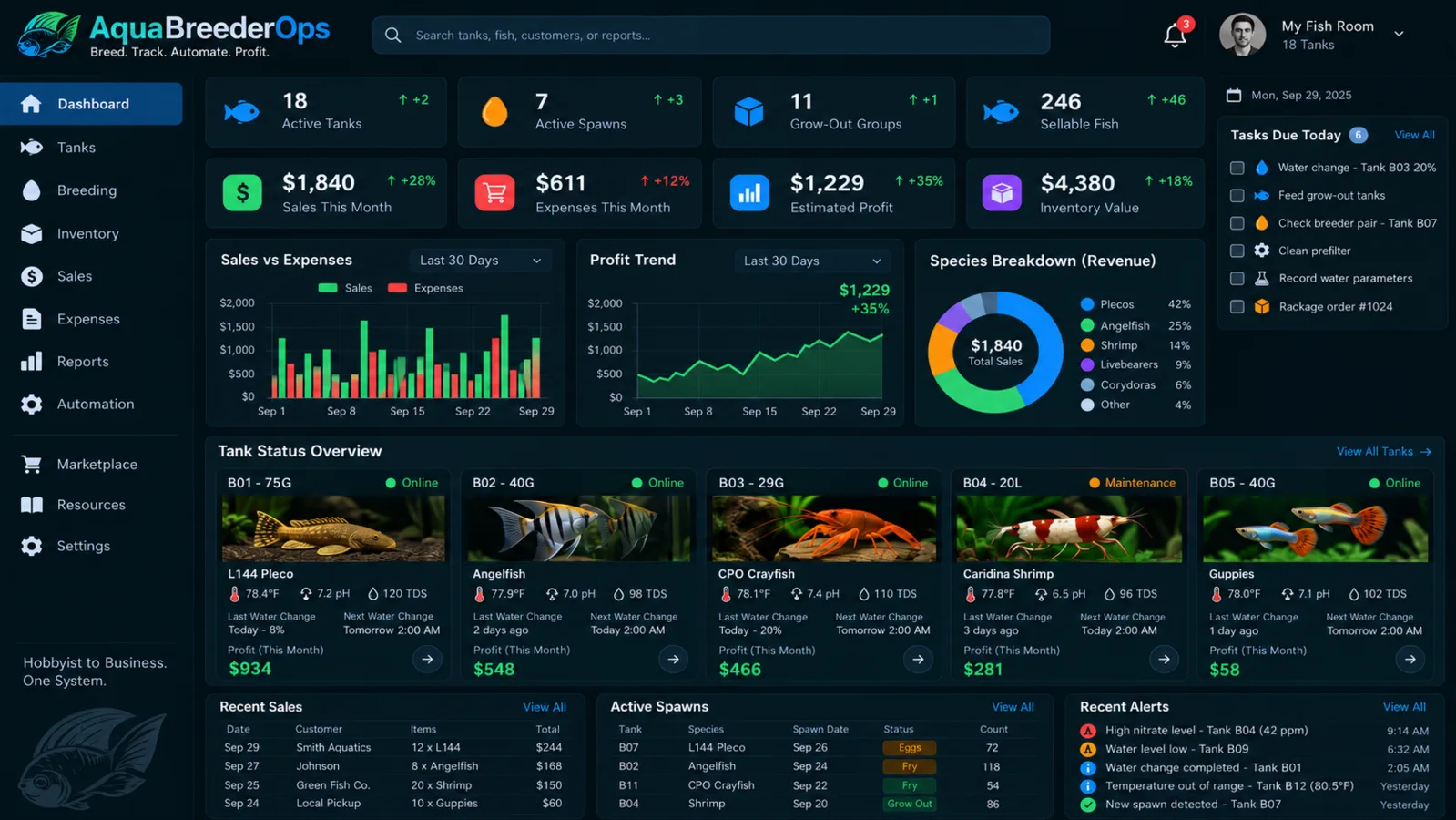
The dashboard turns daily breeder activity into a usable picture: active tanks, spawns, grow-out, sellable fish, sales, expenses, estimated profit, tasks, tank status, and alerts.
AquaBreederOps now keeps species information separate from individual tanks, so common names, scientific names, and selected imagery can follow the species across your operation.

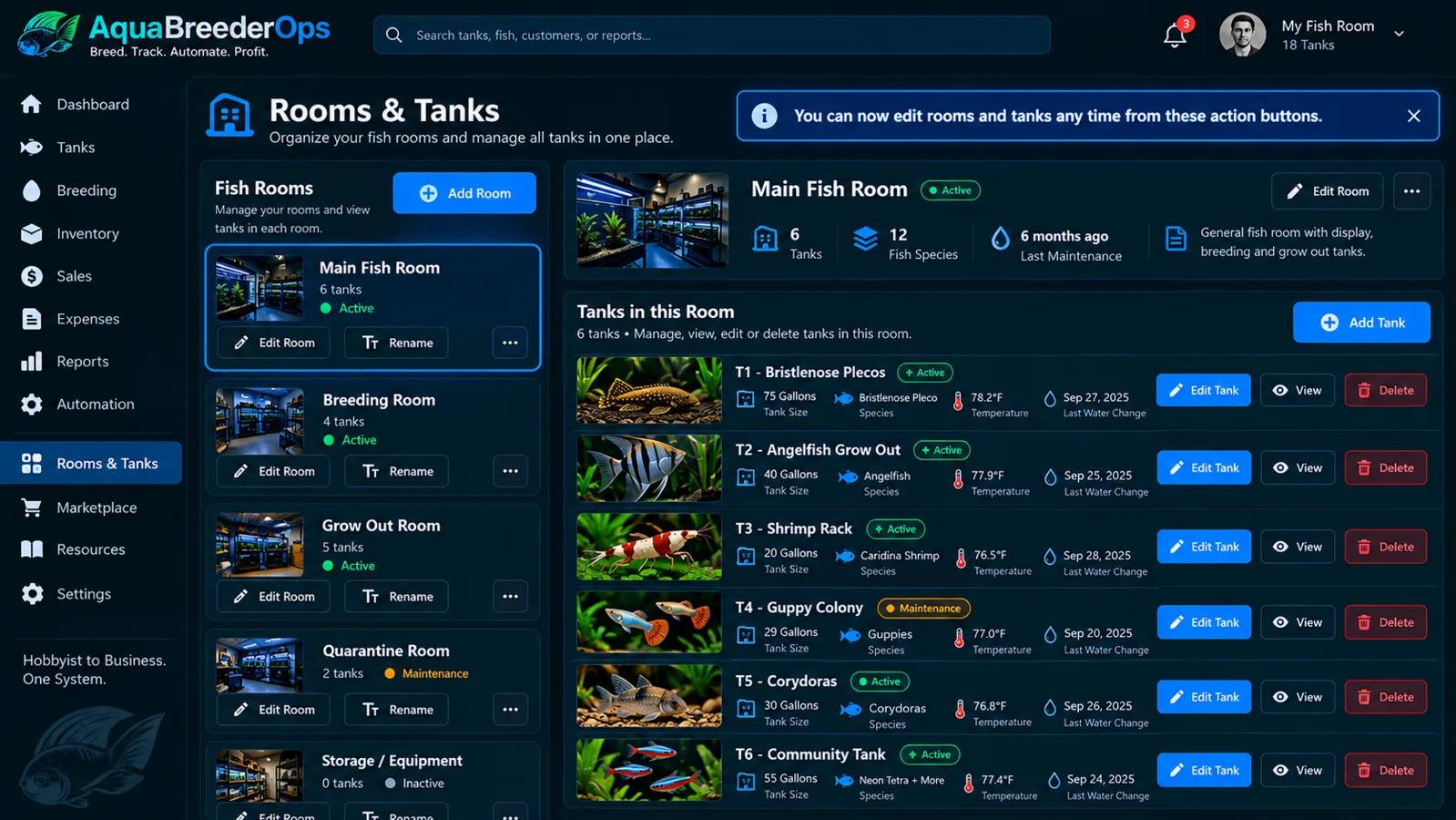
Build your real fish room structure inside AquaBreederOps. Select a room, see its tanks, and manage the details breeders care about without digging through separate notes.
Mirror your real fish room structure.
Pairs, spawns, fry and milestones.
Counts, size, mortality and tank moves.
Inventory, sales, expenses and profit.
The showcase demo is preloaded with multiple rooms, 22 tanks, reusable species profiles, breeding projects, grow-out cohorts, inventory, sales, expenses, tasks, alerts, and automation examples.
Monthly plans are based on fish-room capacity and connected automation devices.
For a small setup or a first look at structured breeder tracking.
For active breeders managing multiple tanks and regular production.
For serious fish rooms that need room to grow and stronger automation capacity.
For larger operations with more tanks and deeper connected-device needs.
AquaBreederOps is currently in private beta. Production signup may require an invitation code while beta access is limited.
Use email/password or supported Google sign-in. AquaBreederOps keeps the marketing site separate from the secure application workspace at app.aquabreederops.com.
Built-in exports and account backup tools help you keep a copy of your breeder data instead of trapping it in a closed workflow.
New accounts can walk through their first room, tank, species, and breeding project with progress that can be skipped and resumed.
AquaBreederOps is a breeder operations platform for organizing fish rooms, tanks, breeding projects, grow-out, inventory, sales, expenses, tasks, and supported automation workflows in one account.
Yes. Paid plans support multiple fish rooms, and each room can contain its own tanks, species, maintenance information, and connected breeder workflows.
Yes. You can track breeder pairs, spawns, hatch/free-swimming milestones, fry counts, stages, notes, and grow-out cohorts.
Yes. Sales, expenses, inventory value, and estimated profit are surfaced in the financial and dashboard views so you can connect breeder activity to business performance.
Yes. The platform includes device, schedule, alert, log, and controller/API foundations for supported automation workflows. Automation capacity depends on your plan.
Yes. Data Tools include CSV import/export for tanks and inventory, plus exports for sales and expenses and a full account backup.
Yes. The species library can search Wikimedia Commons by common or scientific name, let you select an image, retain source and license information, and reuse the saved species profile across matching tanks.
Yes. Open the app and choose Try the Breeder Pro Demo. The showcase workspace resets to curated sample data for a clean walkthrough.
AquaBreederOps is currently being prepared through private beta. Some production deployments require an invitation code while access is limited.
Explore the full Breeder Pro showcase, then build your own rooms, tanks, breeding projects, and business workflow.